
Your IRS Account, Set Up in Under 10 Minutes
An IRS online account lets you check tax records, retrieve your IP PIN, track refunds, and view digital notices without calling the IRS. Identity verification runs through ID.me, and most taxpayers finish the full setup in five to ten minutes.
Key Takeaways
- You must be at least 18 years old and have a Social Security Number (SSN) or Individual Taxpayer Identification Number (ITIN) to create an account.
- The IRS uses ID.me to verify your identity. Two paths are available: self-service (photo ID plus selfie video) or a live video call with an ID.me agent.
- ITIN holders cannot use self-service verification. The video agent path is required.
- Once signed in, you can view transcripts, request an IP PIN, review payments and notices, and download information returns including Form W-2 and the 1099 series.
- Multi-factor authentication is required at every sign-in. Choose a method you can reliably access — text message, authenticator app, or biometric unlock.
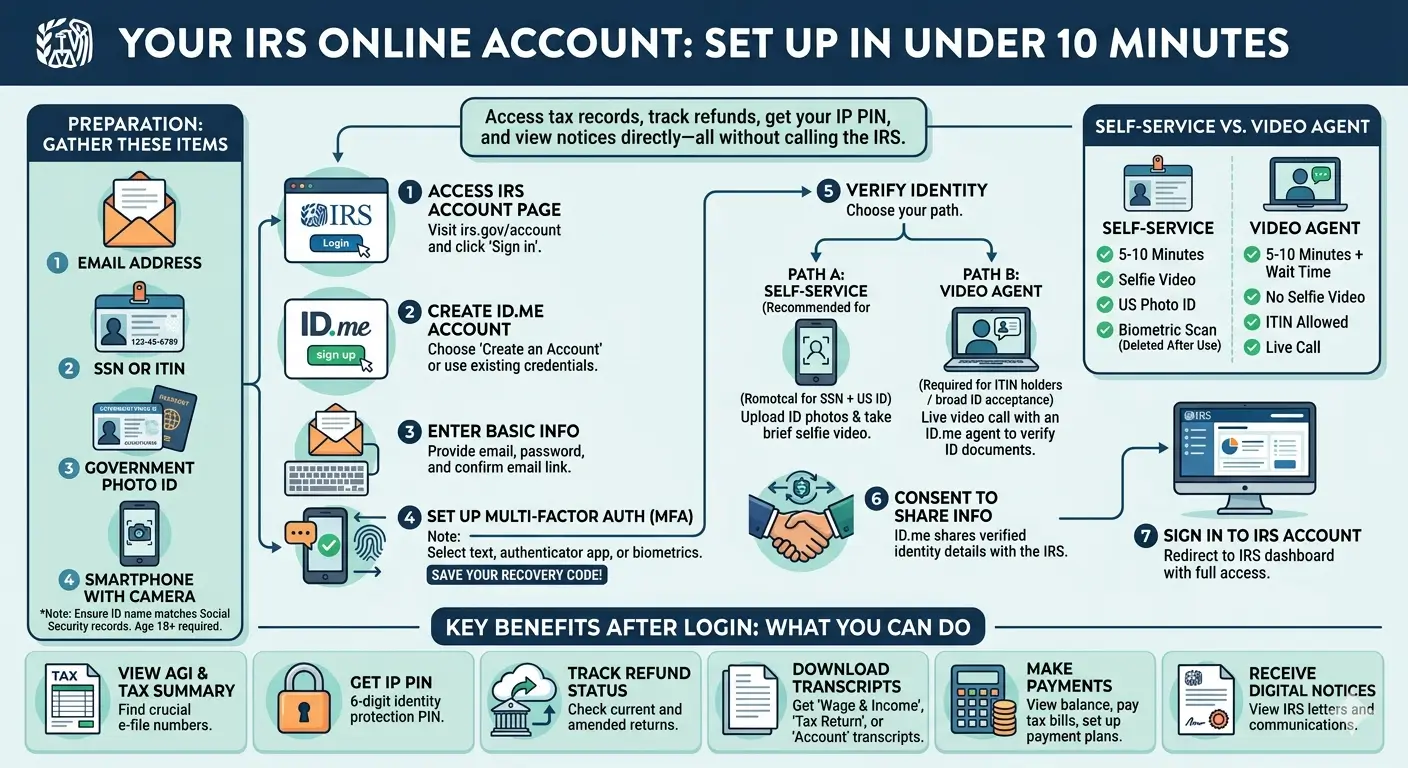
Table of Contents
- 1. Why Every Taxpayer Should Have One
- 2. What You Can Access Once Signed In
- 3. What You Need Before You Start
- 4. Step-by-Step: Creating Your Account
- 5. Self-Service vs. Video Agent — Which Should You Choose?
- 6. Common Errors and How to Fix Them
- 7. What to Do After You Sign In
- 8. EA Insight
- 9. Frequently Asked Questions
- 10. Related Articles
- 11. Official Resources
1. Why Every Taxpayer Should Have One
Reaching the IRS by phone has become harder every year. Wait times during filing season routinely stretch beyond an hour, and some tax records are no longer available through any hotline. An IRS online account gives you a direct window into your federal tax file — open 24 hours a day, with no hold music.
The account is free to create, and the IRS has been actively encouraging taxpayers to enroll. In news release IR-2026-21, the IRS reminded the public that an online account is one of the most effective tools available for protecting against identity theft and staying on top of tax correspondence.
Taxpayers who use the account typically rely on it for five core tasks:
- Looking up prior-year adjusted gross income (AGI) when e-filing requires identity verification
- Requesting and retrieving an Identity Protection PIN (IP PIN) before filing season
- Checking the status of a refund or amended return
- Reviewing IRS notices delivered digitally rather than by mail
- Setting up or modifying a payment plan when a balance is owed
Each of these used to require a phone call, a visit to a Taxpayer Assistance Center, or weeks of waiting by mail. The online account consolidates them into a single dashboard.
2. What You Can Access Once Signed In
The IRS Individual Online Account has expanded significantly in recent years. Once signed in, taxpayers can view the following information and complete the following actions:
| Feature | What You Can See or Do |
|---|---|
| Tax Return Summary | AGI, filing status, taxable income, and key figures from prior returns |
| Transcripts | Account, Return, Record of Account, and Wage & Income transcripts |
| Identity Protection PIN | Request and retrieve your six-digit IP PIN year-round |
| Refund Status | Current-year refund and amended return processing status |
| Payments | Balance owed, payment history, and payment plan management |
| IRS Notices | Over 200 notice types delivered digitally to the account inbox |
| Tax Documents | W-2, 1095-A, 1099-NEC, 1099-DIV, 1099-INT, 1099-MISC (most recent tax years available) |
The information return downloads sit under the Records and Status tab. For taxpayers who have lost a prior-year W-2 or 1099 and need it for mortgage applications, financial aid, or an amended return, this feature alone can save hours of back-and-forth with employers and payers.
New for 2026: The IRS made 2025 wage and income transcripts available on the online account weeks earlier than in prior years — a meaningful improvement for taxpayers who want to cross-check employer and payer data before filing.
3. What You Need Before You Start
Gathering the following items in one place will make the setup faster and reduce the chance of a failed verification:
- A working email address you can access during the session
- A Social Security Number or ITIN. Accessing IRS services without one will trigger error code EC 6101
- A government-issued photo ID — a U.S. driver’s license, state ID, or passport
- A smartphone with a working camera, needed for the selfie video if you choose self-service verification
- A phone number for text messages, or an authenticator app for multi-factor authentication
- Confirmation that the name on your photo ID matches the name on file with the Social Security Administration. A mismatch is the single most common cause of verification failure
Age also matters. The IRS requires account holders to be at least 18 years old. Parents cannot set up an account on behalf of a minor dependent.
4. Step-by-Step: Creating Your Account
The enrollment process moves through ID.me, the IRS’s credential service provider, and then connects you back to IRS.gov. Expect seven distinct steps.
Step 1 — Visit the IRS Online Account Page
Go to irs.gov/account and select Sign in to your Online Account. You will be routed to the ID.me login screen.
Step 2 — Select “Create an Account”
If you already have an ID.me account through another federal or state agency, you can sign in with your existing credentials. First-time users select Create an Account to begin.
Step 3 — Enter Your Basic Information
Provide your email address, create a password, and confirm your email through the link ID.me sends. Use an email account you can access now — verification pauses if you cannot confirm the address.
Step 4 — Set Up Multi-Factor Authentication
Choose one secondary sign-in method: text message, phone call, authenticator app, or biometric unlock (face or touch). ID.me will display a recovery code on the next screen — save it somewhere secure before continuing.
Do not skip the recovery code. If your phone is lost, your number changes, or you switch devices without transferring your authenticator app, the recovery code is what lets you back into your account. Without it, recovery typically falls back to a paper-mail identity verification process that can take weeks to complete — during which time your IRS account remains inaccessible. Store the code in a password manager, a secure note, or a written record kept with other tax documents.
Step 5 — Verify Your Identity
Choose between self-service and the video agent. The practical differences between the two options are covered in Section 5. If you opt for self-service, you will upload images of your photo ID and record a short selfie video. If you choose the video agent, you will join a live call with an ID.me representative who reviews your identity documents on screen.
Step 6 — Consent to Share Your Verified Identity With the IRS
After identity verification succeeds, ID.me asks for your consent to share your verified identity with the IRS. Without this consent, the connection to your IRS tax account does not complete.
Step 7 — Sign In to Your IRS Online Account
You will be redirected to your IRS account dashboard. From this point forward, you can return to irs.gov/account at any time, sign in with your ID.me credentials, and land directly on your tax information.
5. Self-Service vs. Video Agent — Which Should You Choose?
ID.me offers two identity verification paths. Both are accepted by the IRS, but they serve different situations.
| Feature | Self-Service | Video Agent |
|---|---|---|
| Typical Time | 5–10 minutes | 5–10 minutes plus wait time |
| Selfie Video Required | Yes | No |
| Works With ITIN | No | Yes |
| Accepted ID Types | Limited list | Broader list |
| Biometric Data Collected | Yes — auto-deleted after verification | No |
| Best For | Most taxpayers with an SSN and U.S. photo ID | ITIN holders, those without a U.S. driver’s license, those who prefer not to submit biometrics |
ITIN holders often attempt self-service first and run into repeated failures before realizing the path is blocked for non-SSN accounts. Choosing the video agent from the start saves time. The video agent option also supports appointment scheduling, which avoids open-ended hold times.
ID.me is certified against the National Institute of Standards and Technology (NIST) digital identity guidelines (Special Publication 800-63). Any selfie, video, or biometric data submitted for IRS verification is automatically deleted after the process completes, except in cases flagged as suspicious or fraudulent.
6. Common Errors and How to Fix Them
Most verification failures fall into a small number of recurring issues. Recognizing the error code usually points directly to the fix.
EC 6001 — Name Mismatch
The name you entered with ID.me does not match the name the Social Security Administration has on file. This frequently happens after marriage, divorce, or legal name changes that were never reported to the SSA. The fix is to update your name on either your ID.me profile or with the SSA, whichever is incorrect, and retry verification.
EC 6101 — No SSN or ITIN on Record
You verified your identity with ID.me without linking an SSN or ITIN. IRS services require one of the two. Return to your ID.me profile, add your SSN or ITIN, and retry the sign-in.
Selfie Verification Repeatedly Fails
After multiple unsuccessful selfie attempts, ID.me automatically redirects you to the video agent. If selfie matching keeps failing, move lighting to your face, remove glasses, and hold the phone at arm’s length. A plain background helps.
EC 6000 — Security Condition Blocking Access
A security condition on the IRS side is preventing sign-in at the moment. This is typically temporary. Follow the View Alternatives link on the error page to complete the task through another IRS channel while the condition resolves.
Cannot Sign In to an Existing ID.me Wallet
If you previously set up an ID.me account but cannot sign in, the ID.me Help Center has a recovery path that handles lost phones, changed email addresses, and reset multi-factor authentication. The IRS cannot reset ID.me credentials — recovery must go through ID.me directly.
7. What to Do After You Sign In
The first sign-in is the right moment to take a few actions that protect you throughout the year.
- Bookmark the sign-in page. Returning taxpayers often lose 15 minutes searching for the right URL — saving it once removes the friction.
- Request your Identity Protection PIN. An IP PIN is the single most effective protection against someone else filing a return under your SSN. A new PIN is issued each calendar year, so this step recurs annually.
- Review your balance and payment history. Even taxpayers who believe they are current occasionally find an open balance from a prior year.
- Opt into paperless notices. Digital delivery arrives days faster than mail and is easier to archive.
- Download your most recent transcript. A Record of Account transcript is frequently requested by mortgage lenders, immigration attorneys, and financial aid offices. Having a current PDF saved avoids a last-minute scramble.
EA Insight
In my practice, older clients sometimes find it difficult to complete ID.me verification on their own. When that happens, they stop by the office and we sit together at my desk, working through the setup one screen at a time on their own phone.
The sticking points tend to repeat. A few pause at the screen where they need to choose which button to press. Others hold the phone too close during the selfie, or sit in a dim corner where the camera cannot register their face, which sends the system into a retry. Some freeze for a moment when the camera permission pop-up appears, unsure which option protects them.
One thing is consistent. With someone pointing out each screen on their own phone in real time, almost everyone finishes without much trouble. I often see the moment their shoulders drop when the IRS dashboard loads for the first time — that single login opens a direct channel to the IRS that stays open from that day forward.
If a parent or an older relative asks for help setting up an account, my suggestion is to do it in person rather than over the phone. Adjusting the camera angle and guiding each tap is far easier when you are sitting next to them.
Frequently Asked Questions
Is there a fee to create an IRS online account?
No. Both the IRS online account and the ID.me identity verification used to create it are free.
Can I create an account without an SSN?
You need either an SSN or an ITIN. Without one of the two, IRS services will return error EC 6101 and block access. ITIN holders must use the video agent verification path — self-service does not accept ITINs.
How long does the verification take?
Self-service typically takes five to ten minutes of active time. The video agent path adds wait time, though ID.me supports scheduled appointments to minimize it.
Is ID.me safe to use?
ID.me is certified against NIST Special Publication 800-63, the federal digital identity standard. Any biometric data submitted for IRS verification is automatically deleted after the process completes, except in cases flagged as suspicious or fraudulent.
Can my spouse and I share one account?
No. Each taxpayer must create a separate IRS online account under their own SSN or ITIN. Sharing sign-in credentials is prohibited.
How often do I need to renew my IP PIN?
A new IP PIN is issued every calendar year, typically in early January. Retrieve the current year’s PIN from your online account before filing your return.
Can I access prior-year tax returns through the account?
Yes. The account displays key return data for recent years, including AGI and filing status, and gives you direct download access to Account, Return, Record of Account, and Wage & Income transcripts.
Official Resources
Disclaimer: This article is for educational and informational purposes only and does not constitute tax, legal, or financial advice. Tax laws and regulations change frequently. Always consult a qualified tax professional for advice specific to your individual situation. eataxwise.com and its author are not responsible for any actions taken based on the information provided in this article.